

Post Reply
  • How to run Wildstar in x86/32 bits mode. : Announcements
User avatar PitViper Site Admin Posts: 20215 Joined: Oct 2007
User avatar
Site Admin
Posts:20215 Joined:Oct 2007
Grab the attached file. (original author Jadd)

DOWNLOAD LINK:
wildstarplatformselector.zip
Wildstar32 Platform Selector
(6.69 KiB) Downloaded 1453 times


1. Download WildstarPlatformSelector.exe and place it in WildStar's main directory:
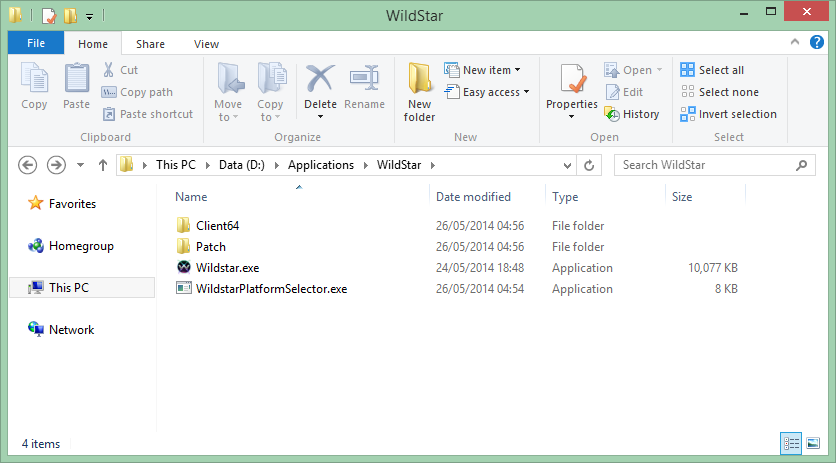
Image


2. Right click WildstarPlatformSelector.exe -> Create shortcut:
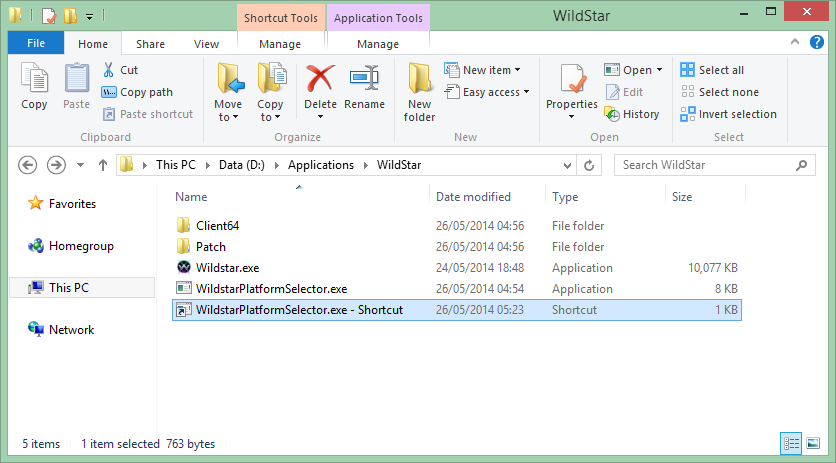
Image


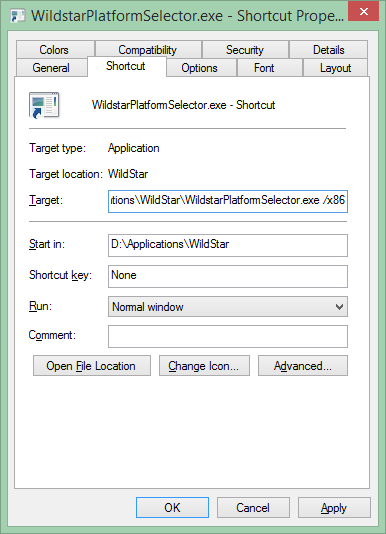
3. Right click the new shortcut -> Properties. Add /x86 (for 32-bit) or /x64 (for 64-bit) to the end of the "Target" box. Additionally, you can use -dx9 or -dx11 to specify which DirectX version to use:
Image


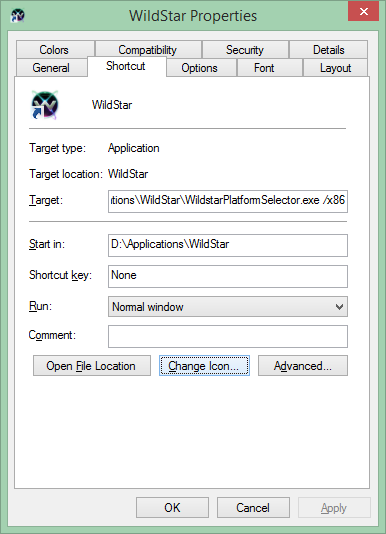
4. Click OK. You may rename the shortcut and change it's icon to look more suitable for WildStar:
Image


5. Move the shortcut to your desktop, your quicklaunch bar, or any place where you would normally start WildStar from.
Opening WildStar by using this shortcut will now download and run the correct game files.
Image


Congrats! You now have the ability to choose which platform you will run WildStar under!

franske82 Posts: 41 Joined: Dec 2009
Posts:41 Joined:Dec 2009
It says it can not start my program because MSVCP120.dll is missing?
User avatar PitViper Site Admin Posts: 20215 Joined: Oct 2007
User avatar
Site Admin
Posts:20215 Joined:Oct 2007
You may need to install some c++ runtimes.

The 2013 one I think is the correct one (choose x86 version when asked.

C++ Runtime 2013
http://www.microsoft.com/en-us/download ... x?id=40784
gamer4156 Posts: 6 Joined: Apr 2014
Posts:6 Joined:Apr 2014
the 2013 Download worked. Am I missing a setting? But log just sits on waiting for player mana. I am a warrior.
User avatar PitViper Site Admin Posts: 20215 Joined: Oct 2007
User avatar
Site Admin
Posts:20215 Joined:Oct 2007
Please make new thread for troubleshooting not related to topic.
zingira Posts: 53 Joined: Sep 2012
Posts:53 Joined:Sep 2012
When i try to change the name of the shorcut I receive the following error message,windows 7.

Image

Thx.
cecilxtr Posts: 9 Joined: May 2014
Posts:9 Joined:May 2014
zingira wrote:When i try to change the name of the shorcut I receive the following error message,windows 7.

Image

Thx.
x86 should be outside the ""
User avatar PitViper Site Admin Posts: 20215 Joined: Oct 2007
User avatar
Site Admin
Posts:20215 Joined:Oct 2007
Yea it should look like this:

"c:\Your Folder Name\WildStar\WildstarPlatformSelector.exe" /x86
nimnim Posts: 48 Joined: Sep 2012
Posts:48 Joined:Sep 2012
When I click to download the premium wildstar bot it says page can't be displayed. Do I need to install this first? What even is this?

Thanks
zingira Posts: 53 Joined: Sep 2012
Posts:53 Joined:Sep 2012
Ok Pit working,Yes Pit the error mensage:
"The requested URL /Premium/Downloads/WILDSTAR/WSViperRelease2.0.9.0a.zip was not found on this server."
Thx
Last edited by zingira on Sat Jun 21, 2014 12:54 pm, edited 1 time in total.
User avatar PitViper Site Admin Posts: 20215 Joined: Oct 2007
User avatar
Site Admin
Posts:20215 Joined:Oct 2007
I just updated it to 2.0.9.0a. Try again to download.
zingira Posts: 53 Joined: Sep 2012
Posts:53 Joined:Sep 2012
The game was not found in memory,I get that error with the new version of bot running /x86.:(
Sorry,i restart and work.
User avatar PitViper Site Admin Posts: 20215 Joined: Oct 2007
User avatar
Site Admin
Posts:20215 Joined:Oct 2007
Glad you got it working.
klepp0906 Posts: 14 Joined: Jun 2014
Posts:14 Joined:Jun 2014
just curious - I apologize if this has been noted elsewhere or asked elsewhere (im sure it has) but im new/just signed up today.

Are their plans to make this 64-bit compatible? :P
franske82 Posts: 41 Joined: Dec 2009
Posts:41 Joined:Dec 2009
Greetings klepp0906, there will be a x64 version.
But it might take another week orso before it is done.
First there are a few more prio's to get the alpha version more stable.
Post Reply

Return to “Announcements”