

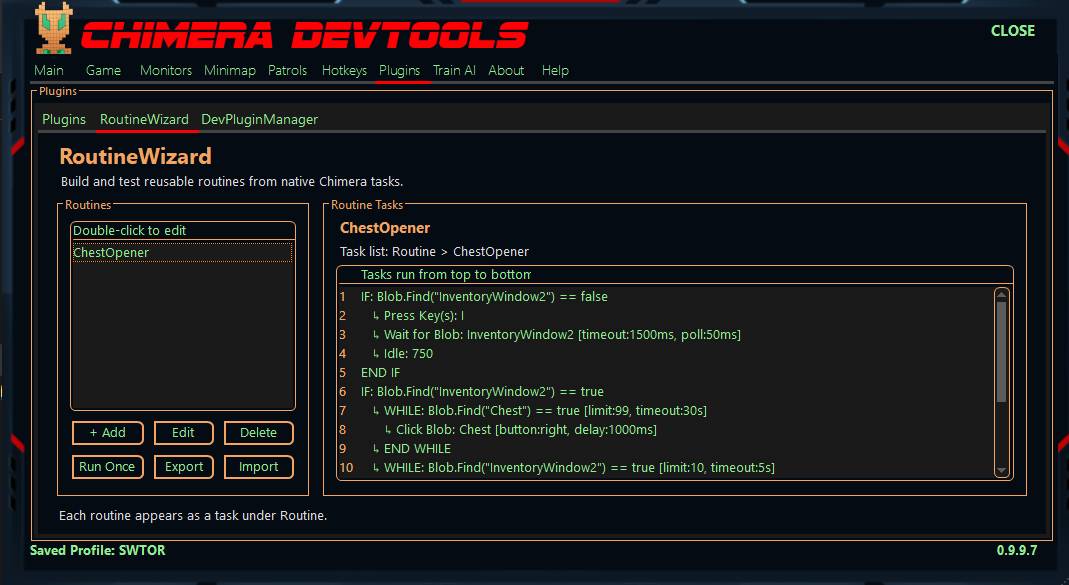
RoutineWizard is a Chimera plugin designed to make it much easier to build, test, debug, reuse, and share groups of tasks.
Instead of rebuilding the same sequence of Chimera tasks every time you need it, you can create a named routine once and then use that routine anywhere Chimera allows normal tasks.
Includes ChestOpener and TrashDumper demo routines that you can import, test, modify, and use as examples for your own routines.
What Can RoutineWizard Do?
- Create reusable routines made from normal Chimera tasks.
- Clone existing routines as a starting point for new ones.
- Add, edit, remove, and reorder tasks using the Routine Editor.
- Drag and drop tasks to quickly change their execution order.
- Double-click tasks to edit them directly.
- Automatically adds placeholders and matching endings when adding certain IF and WHILE blocks.
- Displays conditional and loop blocks with indentation so larger routines are easier to read.
One of the main features of RoutineWizard is the built-in debugger.
You can select any task in a routine and start debugging directly from that point.
While debugging you can:
- Step through tasks one at a time.
- Skip the current task.
- Continue normal execution.
- Jump To another task in the routine.
- Stop the debugging session.
- Set breakpoints by clicking the red-dot column beside a task.
This makes it much easier to troubleshoot larger routines without repeatedly starting the entire routine from the beginning.
Run Routines Like Normal Chimera Tasks
Every routine you create is automatically added to Chimera's task list under the Routine category.
That means a complete routine can be inserted into another patrol or task sequence as a single task.
For example:
Code: Select all
Routine: My Farming RoutineWhen Chimera reaches that task, RoutineWizard loads and executes the tasks stored inside the routine.
This allows routines to act as reusable building blocks for larger setups.
Run & Test From The Editor
You don't need to create a patrol just to test a routine.
The RoutineWizard interface includes a Run Once option, and the Routine Editor can also run the routine directly.
This makes it useful for quickly testing changes while building a routine.
Import & Export Routines
Routines can be exported to:
Code: Select all
.routinewizard.jsonINCLUDED DEMO ROUTINES
RoutineWizard includes two ready-made demo routines:
- ChestOpener — A practical demo showing how a complete automated routine can be built and configured.
- TrashDumper — Another practical example demonstrating how reusable routines can be put together and used.
When exporting a routine, individual tasks can be marked as EDIT REQUIRED.
This is useful when sharing routines that contain something the person importing it will need to configure themselves, such as a scanner, location, key, or other character-specific setting.
Tasks marked as EDIT REQUIRED are clearly highlighted after importing, and RoutineWizard prevents the routine from running until those tasks have been configured.
This helps prevent someone from accidentally running a shared routine with settings intended for another character or setup.
Routine Setup Templates
RoutineWizard also supports routines containing setup fields.
Supported setup values include:
- Blob Scanner
- Keyboard Key
- Integer / Number
- Client Position
The values are then inserted into the routine automatically before it is created.
This allows more advanced routines to be distributed as configurable templates instead of requiring users to manually search through every task and change settings.
Routine Management
RoutineWizard keeps your routines saved in Chimera's configuration.
From the main RoutineWizard tab you can:
- Create a new empty routine
- Clone an existing routine
- Edit a routine
- Delete a routine
- Run a routine once
- Import a routine
- Export a routine
- View the complete task list for a routine
In Short
RoutineWizard turns groups of Chimera tasks into reusable components.
It is especially useful for:
- Building complicated task sequences
- Debugging routines one task at a time
- Reusing commonly repeated groups of tasks
- Keeping large configurations organized
- Sharing routines with other users
- Creating configurable routines that can be quickly adapted to another character or setup
The videos below demonstrate how to create, edit, debug, import, export, and use routines inside Chimera.
Importing the ChestOpener Demo & Running It